You tap a link for a product your friend recommended, but the page is a blank white screen. Three seconds pass. Five. You give up and close the tab, the potential sale lost forever. This isn’t just a hypothetical; it’s the daily reality for your mobile users when performance is an afterthought.
Every millisecond of delay directly impacts your bottom line, pushing bounce rates up and conversions down. That user frustration is a direct reflection on your brand. The solution isn’t a single, magical fix but a methodical process of identifying and eliminating bottlenecks along the critical rendering path, from the initial server request to the final pixel paint.
This article moves beyond generic advice. We will provide a clear framework for optimizing mobile load times, showing you how to correctly defer non-critical JavaScript, inline essential CSS to accelerate the First Contentful Paint (FCP), and reduce your Time to First Byte (TTFB). You will learn precisely when to use modern image formats like WebP or AVIF and how techniques like tree shaking can dramatically shrink your bundle size, creating a faster, more responsive experience for every visitor.
The High Cost of a Slow Mobile Site
We’ve all been there. You tap a link on your phone, eager to find an answer or buy a product, only to be met with a blank white screen. A loading icon spins endlessly. Each second that ticks by feels like an eternity, and your patience wears thin. That brief moment of frustration is more than just a minor annoyance; for your business, it’s a critical failure point where potential customers simply vanish.
This isn’t just a feeling; the data is unforgiving. Studies by Google show that as page load time increases from one to three seconds, the probability of a user bouncing away skyrockets by 32%. At five seconds, that probability jumps to 90%. Your audience isn’t waiting. They are leaving before your brand even gets a chance to make an impression.
Search engines are designed to reflect this user behavior. With Google’s mobile-first indexing, your mobile site’s performance is a primary factor in how you rank. This experience is quantified through Core Web Vitals, a set of specific metrics that measure real-world user experience:
Largest Contentful Paint (LCP) measures how quickly the main, meaningful content on the page becomes visible.
First Input Delay (FID) tracks the time it takes for your site to respond to a user’s first interaction, like a tap or click.
Cumulative Layout Shift (CLS) quantifies the visual stability of your page, penalizing elements that jump around as they load.
Ultimately, this performance deficit hits your bottom line. The connection between speed and conversion is direct and measurable. For instance, Vodafone improved its LCP by 31% and saw an 8% increase in sales. A slow site doesn’t just cost you traffic or rankings—it actively costs you revenue with every passing second.
Mastering Media: Image and Video Optimization
You’ve been there. Staring at a blank white space on your phone, waiting for that stunning hero image to finally pop in. It’s a moment of pure frustration, where a beautiful design becomes an obstacle. More often than not, the culprit isn’t a complex script but unoptimized, oversized media files that are absolute data hogs on a mobile connection. They are frequently the heaviest assets on a page, and taming them is one of the quickest ways to a faster site. Let’s shift gears for a moment and look at how to do this effectively.
Right Format, Right Size
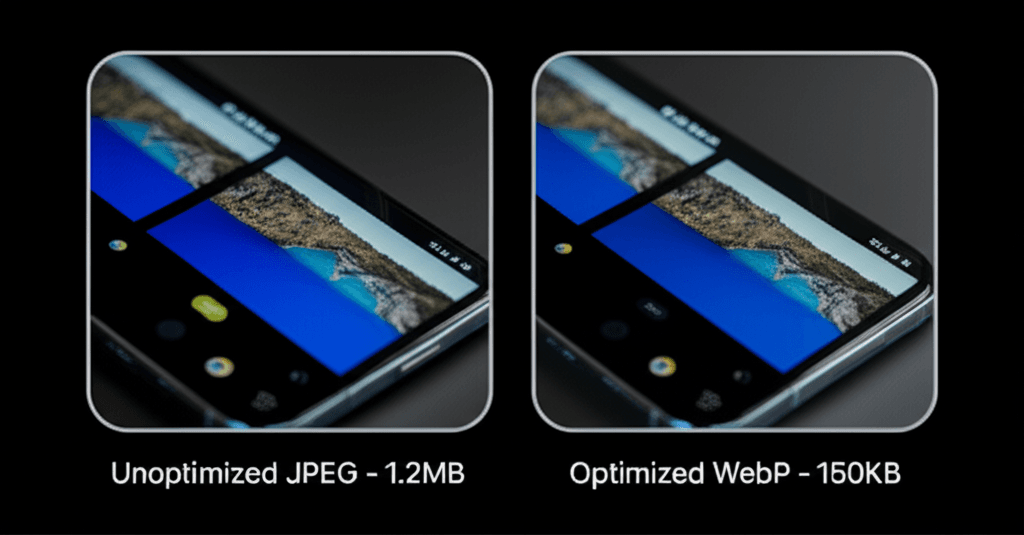
The first step is choosing the correct image format. While JPEG and PNG have been workhorses for years, modern formats like WebP and AVIF offer superior compression, meaning you get significantly smaller file sizes at a comparable visual quality. The browser support for these is excellent now, but you should still provide a fallback. This is easily done using the <picture> element, which lets the browser choose the most modern format it supports. Once you’ve chosen a format, run your images through a compression tool like Squoosh or an automated service. Your goal is to find that sweet spot between a crisp image and a small file. Don’t just save for web; actively compress.
Load What’s Needed, When It’s Needed
Why force a user to download a dozen images at the bottom of a page they may never scroll to? This is where lazy loading comes in. By adding the simple attribute loading="lazy" to your image and video tags, you instruct the browser to defer loading any off-screen media until the user scrolls near it. This simple change dramatically speeds up the initial page load because the browser only has to download the content visible in the viewport. It’s one of the highest-impact, lowest-effort optimizations you can make.
Serve a Different Image for Every Screen
A phone screen doesn’t need the same gigantic 2,000-pixel-wide banner image that a desktop monitor does. Serving that massive file to a mobile device is a colossal waste of bandwidth. Instead, use responsive images. By using the srcset attribute on an <img> tag, you can provide a list of different-sized versions of the same image. For example, you might have image-400w.jpg, image-800w.jpg, and image-1200w.jpg. The browser then intelligently selects the most appropriate file based on the device’s screen size and resolution. This ensures users on small screens get a small, fast-loading image, while users on larger displays still see a high-quality version.
Streamlining Code: Minification & Script Handling
Ever landed on a mobile site where you can see the content, but you can’t scroll or tap anything for a few agonizing seconds? The page looks ready, but it’s frozen, completely unresponsive to your touch. This frustrating pause is often caused by the browser wrestling with hefty code files before it can make the page interactive.
Speaking of which, the biggest offenders are often our own CSS and JavaScript files, bloated with unnecessary data and loaded at the worst possible moment. The first step is a simple clean-up called minification. This automated process strips out everything a browser doesn’t need to interpret the code: comments, white space, and line breaks. For example, a readable line like .button { font-weight: bold; } becomes .button{font-weight:700}. When applied across thousands of lines, these tiny savings add up to a significant reduction in file size.
Prioritizing the Critical Path
Beyond shrinking files, we must control how they load. By default, when a browser encounters a JavaScript file, it halts everything to download and execute it, blocking the page from rendering. You can prevent this performance bottleneck for non-essential scripts using two simple HTML attributes:
defer: This tells the browser to download the script in the background while it continues parsing the HTML. The script will only execute after the page is fully built. This is the safest and most common choice.
async: This also downloads the script in the background, but it will execute it the moment it finishes downloading, which can interrupt page rendering. It’s best reserved for independent, third-party scripts like an analytics tracker.
Finally, stop sending code the user doesn’t need for the current view. Many sites bundle all their JavaScript into one large file, but a better approach is code splitting. This technique breaks your code into smaller, on-demand chunks. A user visiting your homepage only receives the code for that page; the JavaScript for the account settings area is only fetched when they navigate there. You can identify what code is going unused on a given page with tools like the Coverage tab in Chrome’s DevTools, helping you find and eliminate digital dead weight.
Server-Side & Network-Level Enhancements
You’ve done everything right on the front-end. You’ve compressed images, minified JavaScript, and optimized your rendering path. Yet, users still complain about that initial, agonizing wait for the page to even start appearing. That blank white screen lingers just a second too long, especially on a spotty 4G connection. Why? Because no amount of front-end wizardry can fix a slow delivery from the server.
This brings us to something often overlooked: the journey your data takes before it ever reaches the smartphone. Optimizing this path is fundamental to a fast mobile experience. Your server and network configuration can either be a bottleneck or a superhighway for your content.
Content Delivery and Caching
First, get your assets closer to your users. Implementing a Content Delivery Network (CDN) is one of the most effective changes you can make. Instead of forcing a user in Singapore to download files from your main server in Ohio, a CDN serves those files from a local server right in Southeast Asia. This simple reduction in physical distance drastically cuts down latency, the time it takes for data packets to travel back and forth.
Next, tell the browser not to re-download things it already has. By setting proper Cache-Control headers on your server, you can instruct a user’s browser to store static assets—like your company logo, CSS files, and font files—for weeks or even months. For returning visitors, this means subsequent page loads feel nearly instant because most components are already on their device.
Reducing Server Response Time
The speed of your server itself is measured by Time to First Byte (TTFB). This is how long the browser waits after its request before it receives the very first piece of data. A high TTFB is often caused by slow database queries or inefficient back-end code. Profiling your application to find and fix a single, poorly written SQL query can sometimes reduce your TTFB by hundreds of milliseconds.
Finally, consider your connection protocol. Upgrading to HTTP/3 offers a significant advantage for mobile users. It runs on a newer protocol called QUIC, which is far better at handling the packet loss common on cellular networks. Unlike older protocols, one dropped packet doesn’t halt all other data streams, making the connection more resilient and noticeably faster during real-world use.
Advanced Techniques for Elite Performance
You’ve done everything by the book. You’ve compressed images, minified your code, and your First Contentful Paint score is excellent. But when a user on a 3G connection taps a button, there’s that frustrating pause—that moment of dead air where the page is visible but not yet interactive. This gap between seeing and doing is where standard optimizations fall short and a more sophisticated architectural approach is required to deliver truly instant, app-like performance.
Moving beyond simple asset optimization means fundamentally changing how you deliver content to the browser. These techniques focus on anticipating user needs and restructuring your application to serve content with maximum efficiency.
Progressive Web Apps (PWAs): By implementing a service worker, a script that runs in the background, you can intelligently cache your application’s shell and key assets. This means on repeat visits, the page loads almost instantly from the local cache, even if the network connection is poor or completely offline.
Resource Hints: You can give the browser a head start. Use <link rel="preload"> to fetch critical assets needed for the current page, like a specific web font for your hero banner, earlier in the rendering process. For assets needed for a likely next navigation, use <link rel="prefetch"> to load them during browser idle time.
Server-Side Rendering (SSR): Instead of sending a nearly empty HTML file that forces the user’s phone to build the view, SSR delivers a fully rendered, ready-to-view page from the server. This dramatically shortens the time to that first meaningful paint, as the user sees content immediately rather than a blank screen and a loading spinner.
Headless Architecture: Decoupling your front-end from your back-end (e.g., using a JavaScript framework with a Headless CMS) allows for specialized optimization. Your front-end can be served from a global edge network, placing it geographically closer to your users, while your back-end manages content independently.
Imagine an e-commerce site: SSR delivers the product page instantly. A service worker has already cached the main navigation and cart icon. As the user browses, a prefetch directive quietly loads the primary script for the checkout page in the background. When they finally click “Buy Now,” the transition feels immediate because the foundational work was already done. This is how elite performance is built.
From Lag to Loyalty
We’ve all been there: staring at a blank screen, waiting for a mobile page to load, before finally giving up. That moment of frustration is more than an inconvenience; it’s a lost connection, a missed sale. You can rewrite this story. True mobile optimization isn’t about a single trick, but a fundamental commitment to efficiency. It’s the practice of scrutinizing every kilobyte and prioritizing the user’s time above all else, turning a potential bounce into a loyal visitor.
Your path to a faster site begins with a single step. Start auditing your mobile site with PageSpeed Insights today and implement these strategies for a faster, more engaging user experience that respects your audience and your goals.
Frequently Asked Questions
What is a good mobile page load time in 2024?
Ideally, a mobile page should become interactive in under 3 seconds. Google recommends a Largest Contentful Paint (LCP) of 2.5 seconds or less to provide a good user experience.
How can I test my website's mobile speed?
You can use free tools like Google's PageSpeed Insights, GTmetrix, and WebPageTest. These tools provide detailed performance reports and actionable recommendations for mobile and desktop.
Does mobile speed directly affect my SEO ranking?
Yes, absolutely. Google uses page speed, specifically the Core Web Vitals metrics, as a significant ranking factor for its mobile search results. A faster site leads to a better user experience, which Google rewards.